Start up AFNI in realtime mode
Export the following variables:
export AFNI_REALTIME_Registration=3D:_realtime
export AFNI_REALTIME_MP_HOST_PORT=localhost:53214
export AFNI_REALTIME_SEND_VER=YES
export AFNI_REALTIME_SHOW_TIMES=YES
export AFNI_REALTIME_Function=FIM
export AFNI_REALTIME_Graph=Realtime
export AFNI_REALTIME_Base_Image=0
export AFNI_REALTIME_Mask_Vals=All_Data_light
Start AFNI in realtime mode:
afni -rt
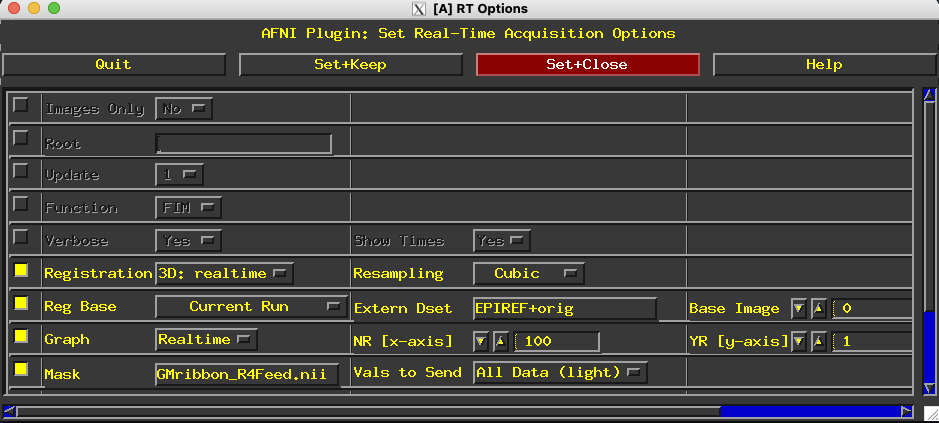
Go to Define Datamode > Plugins > RT Options
Set Reg Base to External Dataset.
Set Extern Dset to your EPI reference dataset (e.g., EPIREF+orig).
Set Mask to your mask dataset (e.g., GMribbon_R4Feed.nii).
Set NR [x-axis] to the expected number of volumes in your run.
See below for how your setup should look:
TODO: have detailed instructions for when down at the scanner